
Who’s in, who’s off, and where they’re sitting.
Catapult brings holiday requests, sickness, desk and meeting-room bookings into one place, so UK teams can plan the office week without a spreadsheet.
Free for up to 5 people. No card needed.
One place for the whole working week
Catapult replaces the holiday spreadsheet, the desk rota and the “who’s in tomorrow?” message.
Leave requests
People book holiday in a few clicks and see their balance straight away.
Approvals
Requests reach the right approver, with reminders and cover when they're away.
Sickness
Recorded apart from holiday, with every view of a record logged.
Bank holidays
Import public holidays for England and Wales, Scotland or Northern Ireland.
Desk booking
Buildings, floors and desks, and who'll be in that day before you book.
Meeting rooms
Book rooms by the half hour and add the colleagues joining you.
Who's in today
In the office, working from home or on leave, team by team.
Office reports
Attendance by day, team, building and room, ready to export as a PDF.
Google Calendar
Approved leave appears in the shared calendar you choose.
Teams and roles
Teams, line managers, an org chart and five clear access roles.
Holiday requests that don’t get stuck
People request leave in a few clicks and see what they have left. The right person approves it, and if a request sits waiting, Catapult sends the reminder so nobody has to chase.
- Your own leave types, working days and leave year, with a 25-day allowance to start from
- Half-days and per-person allowances on Starter and above
- UK bank holidays imported for your nation, plus your own closure days
- Team rules that cap how many people can be off at once
- Reminders for waiting requests, and cover while an approver is away
- Multi-level approvals on Professional

Priya Shah
Design
- Leave
- Annual
- Dates
- 26–30 Oct
- Left after
- 15 days
 Reviewing
Leila Haddad
Team lead

 Next
NextNoah Caldwell
Covering for Claire Donovan
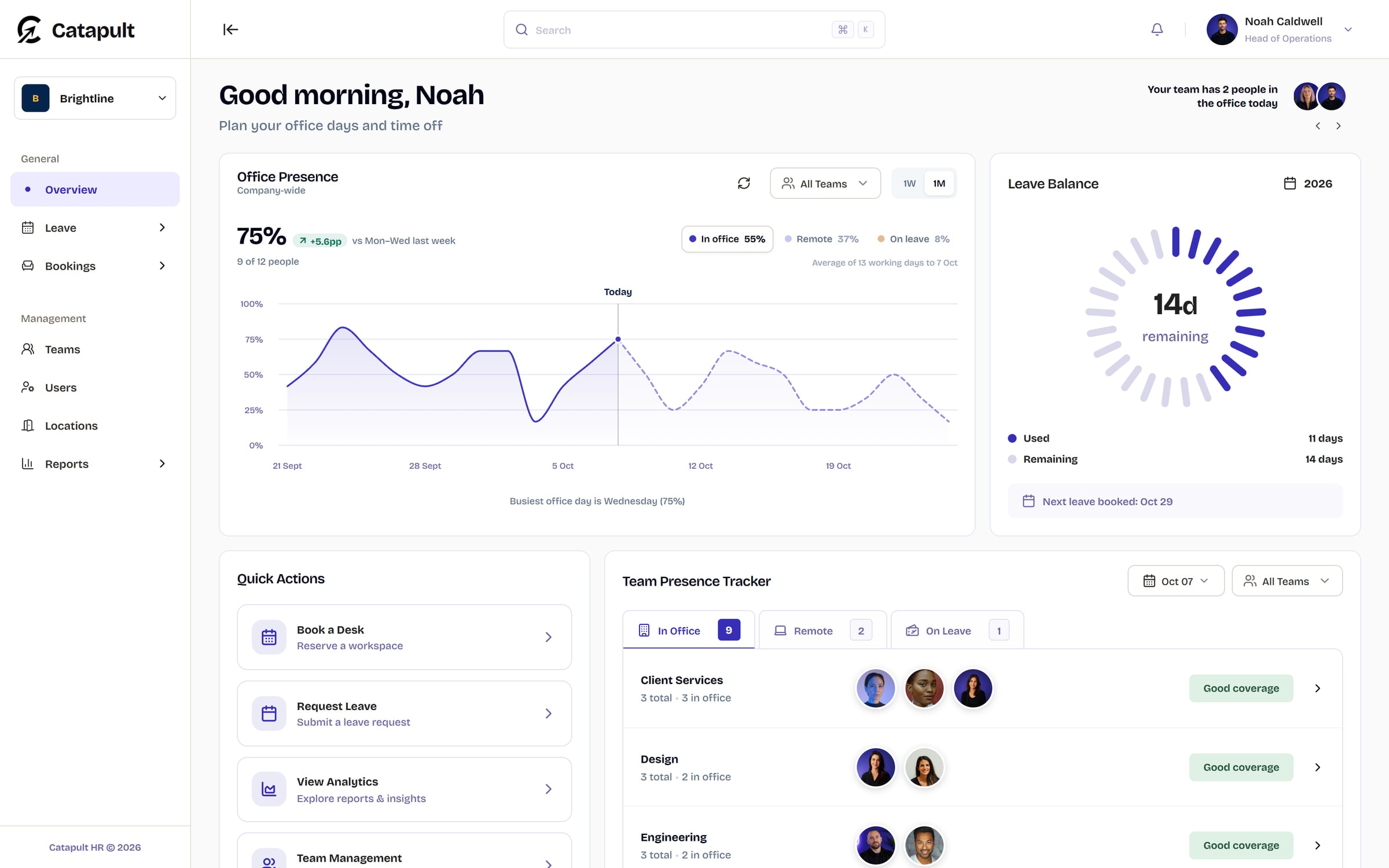
From “who is in?” to desk booked.
See the whole office picture before you commit, then turn a good day to meet into a confirmed place to work. These are the real screens, in three steps.
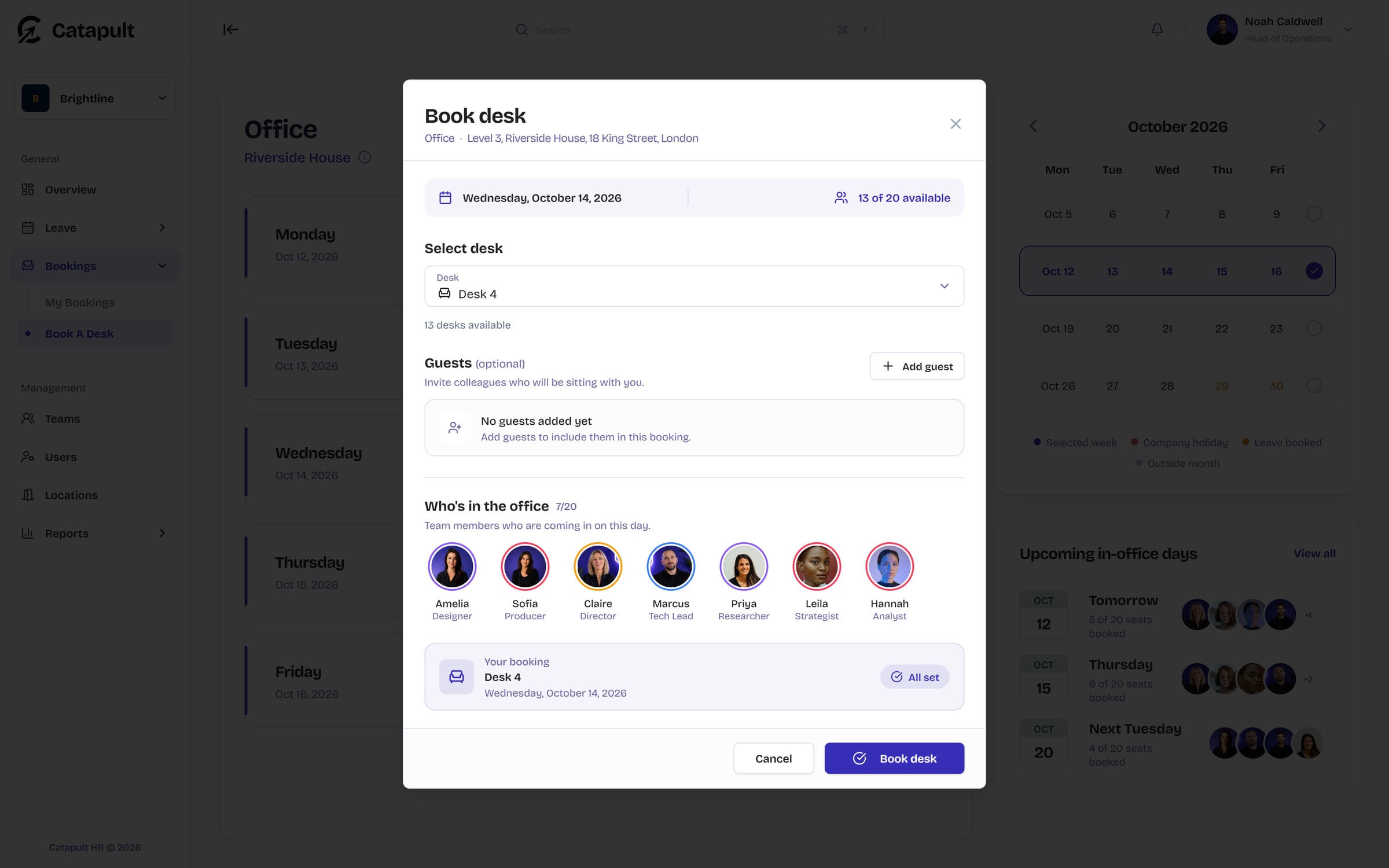
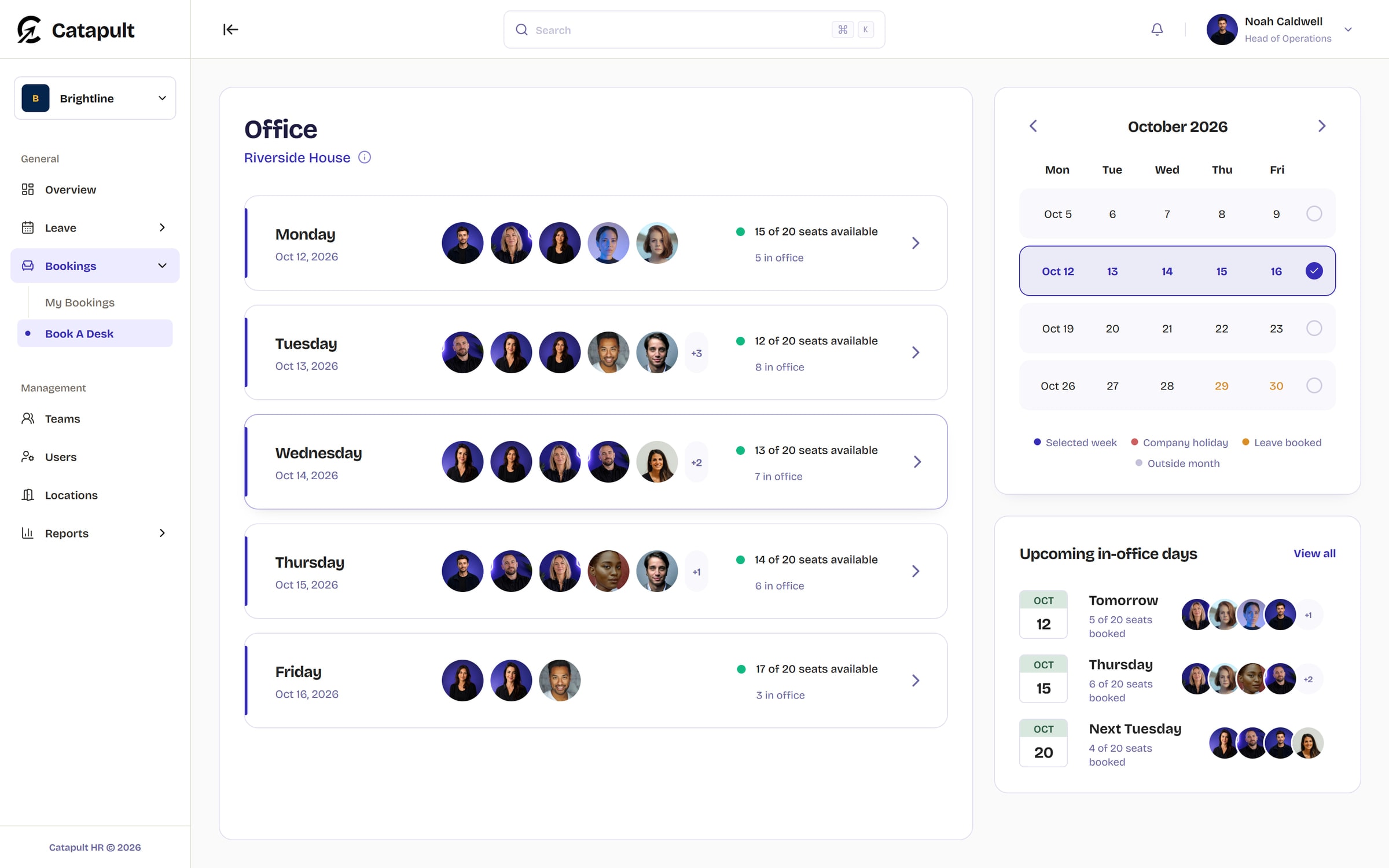
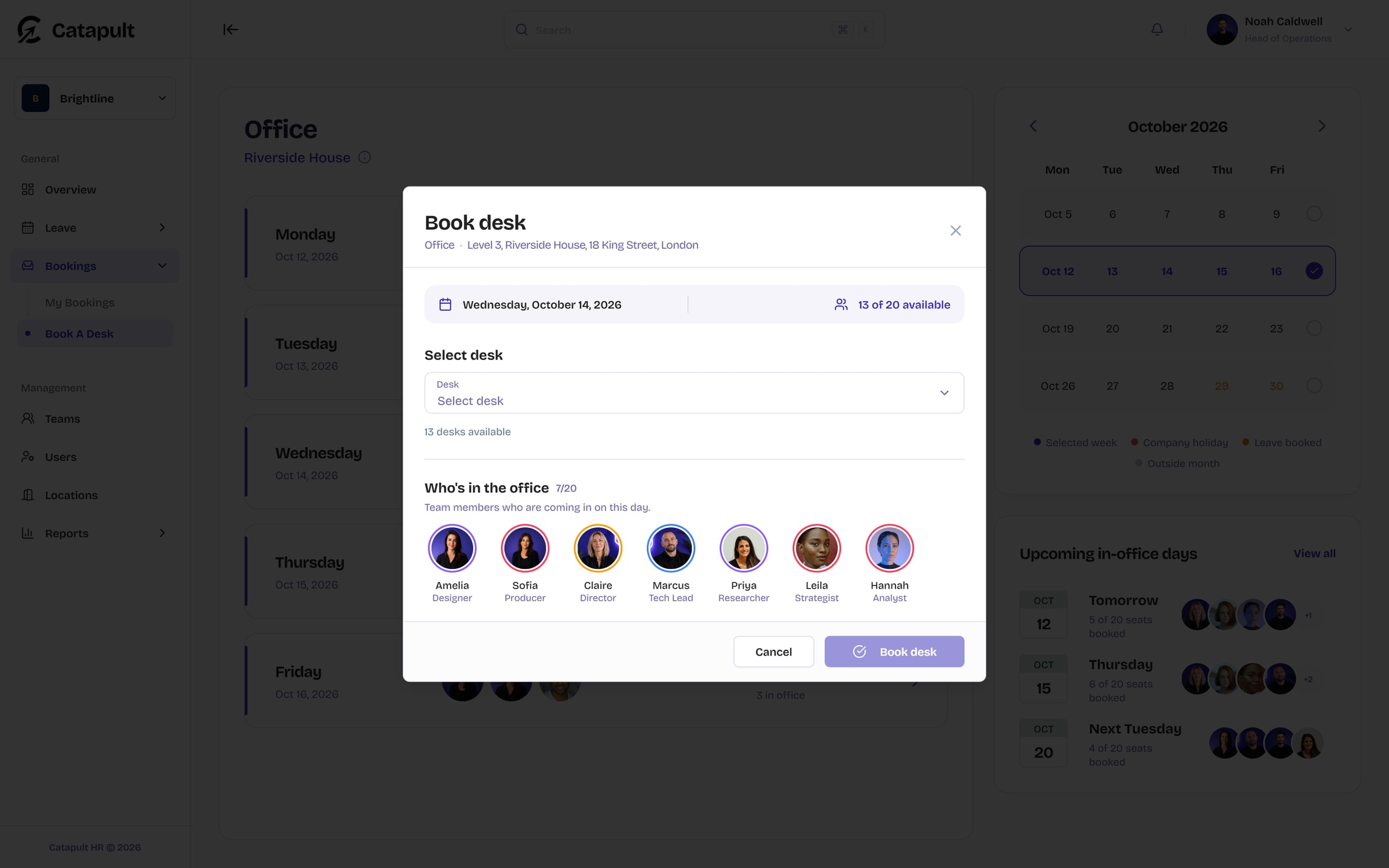
Step 1 of 3: Find the right day for the whole team
Know who’s in before you go in
The dashboard shows who is in the office, working from home or on leave, team by team. Pick your office days, check each team’s cover and see a month of attendance without asking around.
Wednesday 7 October
9 of 12 inIn the office





Working from home


On leave
 Back Monday
Thames room
Thu 8 Oct, 1 hour
11:30 to 12:30 with 2 coworkers
Meeting rooms by the half hour
Pick a room and a length, from 30 minutes to four hours, choose a free slot and add the coworkers who are joining you.
Average workforce by weekday
Last 3 months, all teams
Reports for the leadership meeting
Attendance by weekday, team, building and room, with team comparisons. Reports start on Starter; Professional adds any period and PDF exports.
Approved leave lands in Google Calendar
Choose the shared calendar your team already checks and the leave types that belong there. Catapult adds approved leave as it happens and keeps the calendar up to date if plans change.
Included from Starter. Disconnect at any time, keeping or removing Catapult’s events. Outlook Calendar is coming soon.
Team Leave
Shared Google calendar
- Mon26Annual Leave - Priya S, Omar F
- Tue27Annual Leave - Priya S, Omar F
- Wed28Annual Leave - Priya S, Omar F
- Thu29Annual Leave - Priya S, Noah C
Built for people data
Leave and sickness records are personal. Catapult gives you the controls to keep them that way.
Your records and the web app are hosted in London. The privacy policy lists every supplier we use and where.
Audit log
All categories
- Security
Updated the company two-factor policy
Noah Caldwell, 09:14
- Leave
Imported public holidays
Claire Donovan, 08:47
- Facilities
Added a room
Ellie Barnes, Yesterday
- Access
Changed a user's role
Noah Caldwell, Yesterday
- Leave
Changed a team's leave rules
Claire Donovan, Monday
- Security
Signed out a device remotely
Noah Caldwell, Monday
Two-factor sign-in
Optional, or required for everyone or for people you choose, with a grace period to set it up.
Clear roles
Employee, HR admin, facilities admin, billing admin and admin, plus the account owner.
An audit log
Role changes, leave settings, rooms, integrations and security events, with who did what and when.
Sign-in alerts
Emails when someone signs in from a new device or changes a password or two-factor setting.
Session control
See where an account is signed in and sign out any device remotely.
Private sickness records
Sickness is kept apart from holiday, and every view of a record is logged.
Deletion done properly
Employees can ask for their data to be deleted. Closing the account has a 7-day cooling-off period.
A history for every request
Each leave request keeps its own record of what changed, when and by whom.
One price for your whole team
Plans are priced per company, not per person. Every workspace starts free, and you can upgrade from Settings whenever you need more people, rooms or reports.
Free
For very small teams trying things out
£0per month, for your company
Start free- Up to 5 people
- 1 building, 2 rooms
- Leave requests and approvals
- Dashboard and who's-in view
- Desk and room booking up to 7 days ahead
- Up to 2 teams
- Email support
Starter
For small teams up and running
£49per month, for your company
Get started- Up to 25 people
- 2 buildings, 10 rooms
- Office and capacity reports (month to date)
- Half-days, custom allowances and leave history
- Desk and room booking up to 30 days ahead
- Google Calendar sync
- Up to 10 teams
- Recommended
Professional
For growing companies across sites
£99per month, for your company
Get startedEverything in Starter, plus:
- Up to 100 people
- 5 buildings, 25 rooms
- Multi-level approvals
- Reports for any period, by team and person
- PDF report exports (50 a month)
- Desk and room booking up to 90 days ahead
- Unlimited teams
- Priority support
Enterprise
For large organisations
CustomTailored to your organisation
Contact salesEverything in Professional, plus:
- Unlimited people
- Unlimited buildings and rooms
- Unlimited report exports
- Desk and room booking up to a year ahead
- Dedicated onboarding
- Priority support with an SLA
Prices exclude VAT. Paid plans renew automatically until cancelled. Upgrades take effect straight away, charged pro rata; downgrades apply at the end of the period you have paid for.
Questions before you start
Something not covered here? Email support@catapult-hr.co.uk and we’ll get back to you.
Start freeUK organisations that want leave, sickness and office bookings in one place, from a team of five to companies across several sites. Free covers up to 5 people, Starter up to 25, Professional up to 100, and Enterprise has no limits.
Plan next week in Catapult
Set-up takes minutes: add your office, invite your team and the week starts filling itself in.
Free for up to 5 people. No card needed.